
MyMohawk Redesign
1. Project Overview:
Title: Improving the MyMohawk Registration Experience
Role: UX/UI Designer
Team: 3 Designers (Francesca Avanceña, Matthew Gawley, Kyla Fukasawa-Rowan)
Tools Used: Figma, Google Forms
Timeline: 3 Weeks
We redesigned the MyMohawk student registration section to improve usability, reduce confusion, and enhance the student experience based on real user feedback.
2. The Problem
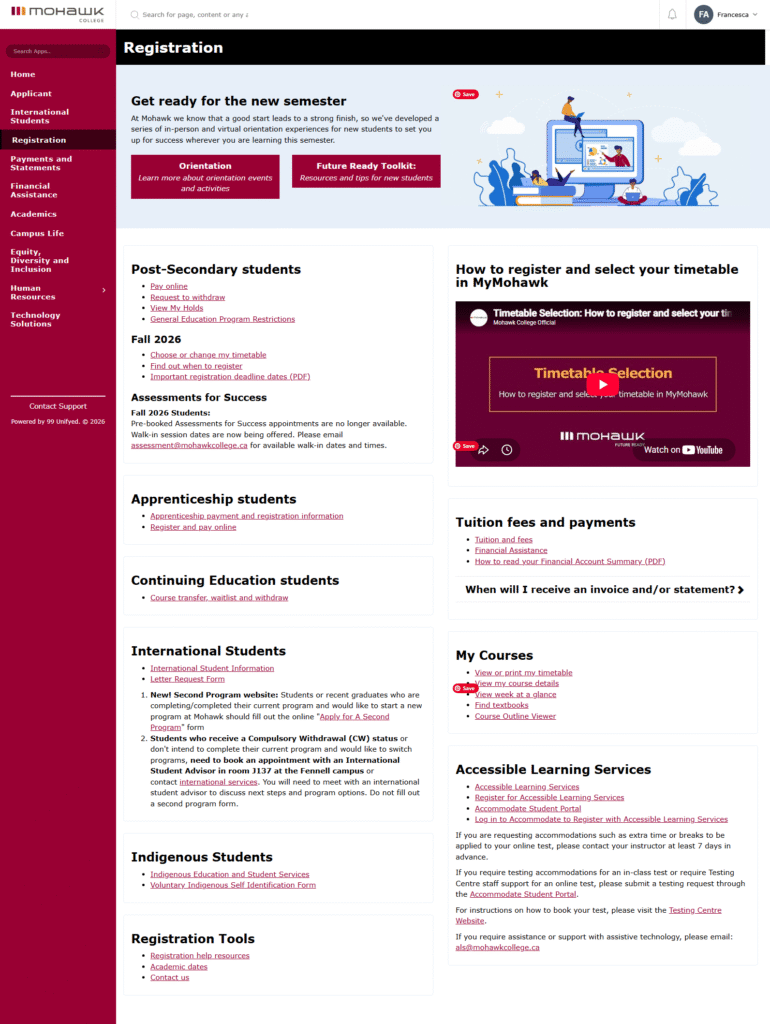
Students had difficulty finding important registration links, understanding orientation information, and navigating an overwhelming layout filled with too much text and poor hierarchy.
User Pain Points Identified:
- Links with vague or misleading labels (e.g. “Registration Tools”)
- Poor visual hierarchy (too many options, unclear groupings)
- Difficulty finding academic dates, contact info, orientation, and fee information
3. The Goal
The goal was to create a registration page that feels organized, approachable, and easy to scan.
We wanted students to be able to quickly understand the different areas of the registration process and expand only the sections relevant to them.
Design goals
- Organize information into clear categories.
- Reduce visual clutter.
- Make important information easier to find.
- Create a more engaging visual experience.
- Use imagery to help students understand and navigate the content.
- Allow users to expand sections without leaving the main page.
4. Research & Discovery
We conducted several survey questions focusing on questions such as:
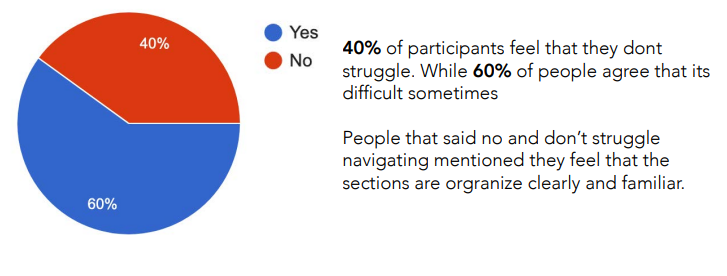
Do you find it hard to navigate the Registration section of the website?
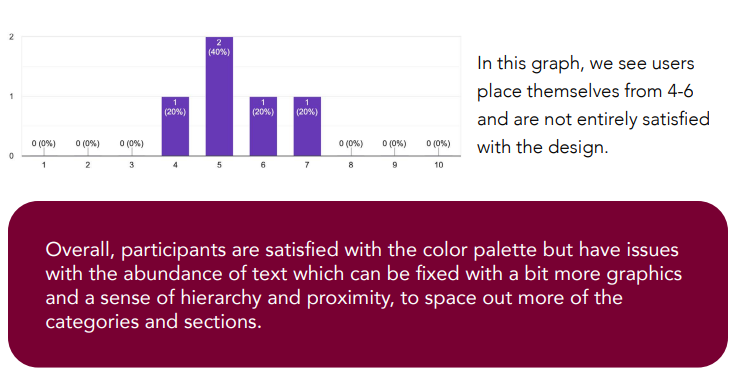
How do you feel about the Registration section of the MyMohawk website?
- What do you like/dislike about the Registration are of MyMohawk website?
From this, we identified several key areas that could be improved, particularly the dashboard, navigation, and organization of student resources.
5. The Design Solution
Bento-Box Layout
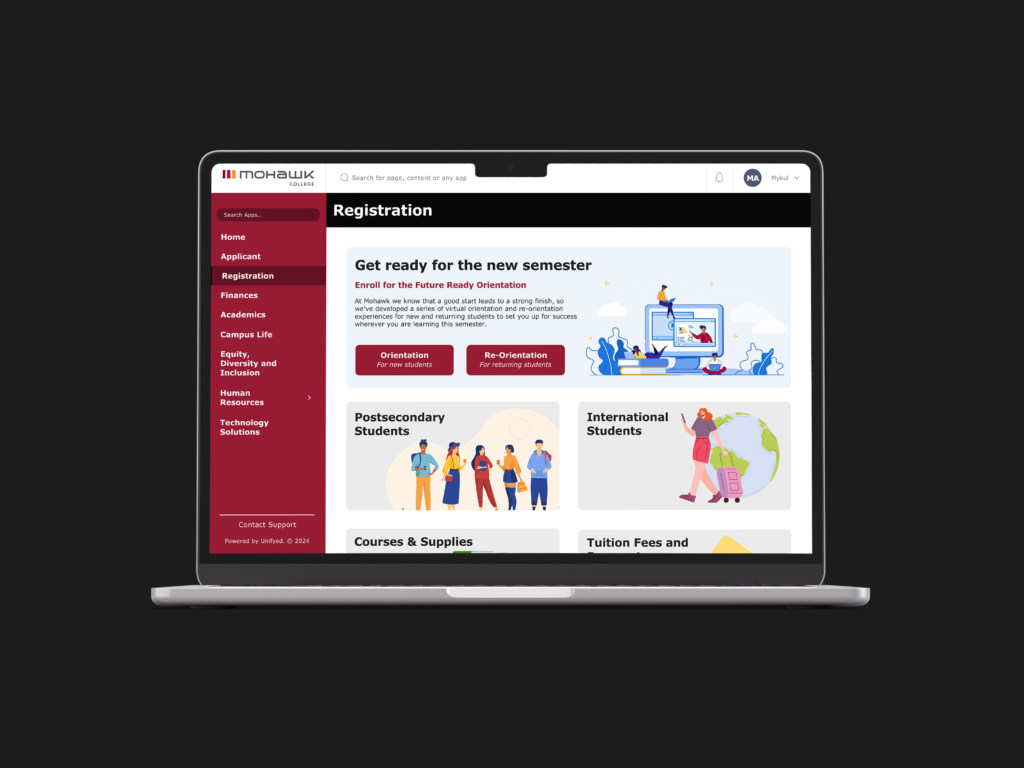
I redesigned the page using a bento-box style layout, separating registration information into individual visual sections.
Each box represents a different part of the registration process, creating a clear visual hierarchy while allowing students to scan the page quickly.
Rather than presenting every piece of information at once, the boxes can be expanded to reveal additional content.
This keeps the initial interface clean while still providing students with the detailed information they need.
Expandable Information
The expandable sections were designed to support progressive disclosure.
Students can first see the main topic and decide which information is relevant to them. When they select a section, it expands to provide additional details.
This approach helps prevent the page from becoming unnecessarily long or text-heavy while keeping all of the necessary registration information accessible.
Visual Support
We also incorporated images and visual elements throughout the page to make the registration experience more engaging and easier to understand.
The imagery helps break up large amounts of information and gives each section a stronger visual identity.
This creates a more approachable experience compared to relying primarily on text.
Information Architecture
We organized the content into distinct sections based on the different types of information students may need during registration.
The bento layout allows these categories to exist together on one page while maintaining a clear separation between them.
This makes it easier for students to scan the page, identify the topic they need, and expand that section for more information.
Wireframes
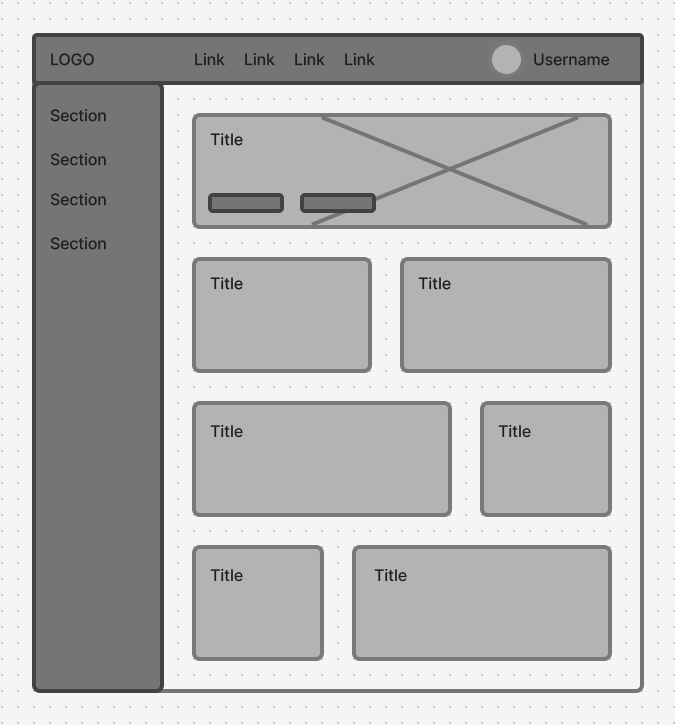
I began by exploring different ways to structure the registration information before moving into the final interface.
The wireframes helped determine:
- How the information could be grouped.
- Which sections should be immediately visible.
- How expandable content could work.
- How the bento layout could adapt to different screen sizes.
- Where imagery could support the content.
6. Final Design
The final redesign transforms the registration page from a primarily information-heavy experience into a visual, modular interface.
The bento-box structure creates a clear overview of the registration process, while expandable sections allow students to access more detailed information without overwhelming the page.
Images and visual elements further support the content and make the experience feel more engaging.
Reflection
This project strengthened my understanding of how information architecture and visual design can work together to simplify complex content.
The main challenge was not removing information, but finding a better way to organize it.
Using expandable bento-style sections allowed me to keep the registration information accessible while giving students more control over how much information they see at once.
The project also allowed me to explore progressive disclosure, responsive layouts, visual hierarchy, and designing for information-heavy student experiences.